GitCrisp icon

GitCrisp

Everything Git knows, one glance away.
Everything Git does, one undo away.

A desktop Git client that keeps the graph, the diff, the blame and the reflog in a single window — and never runs a destructive operation without showing you what it will do and how to get back. Built with Python and Qt.

Download View on GitHub
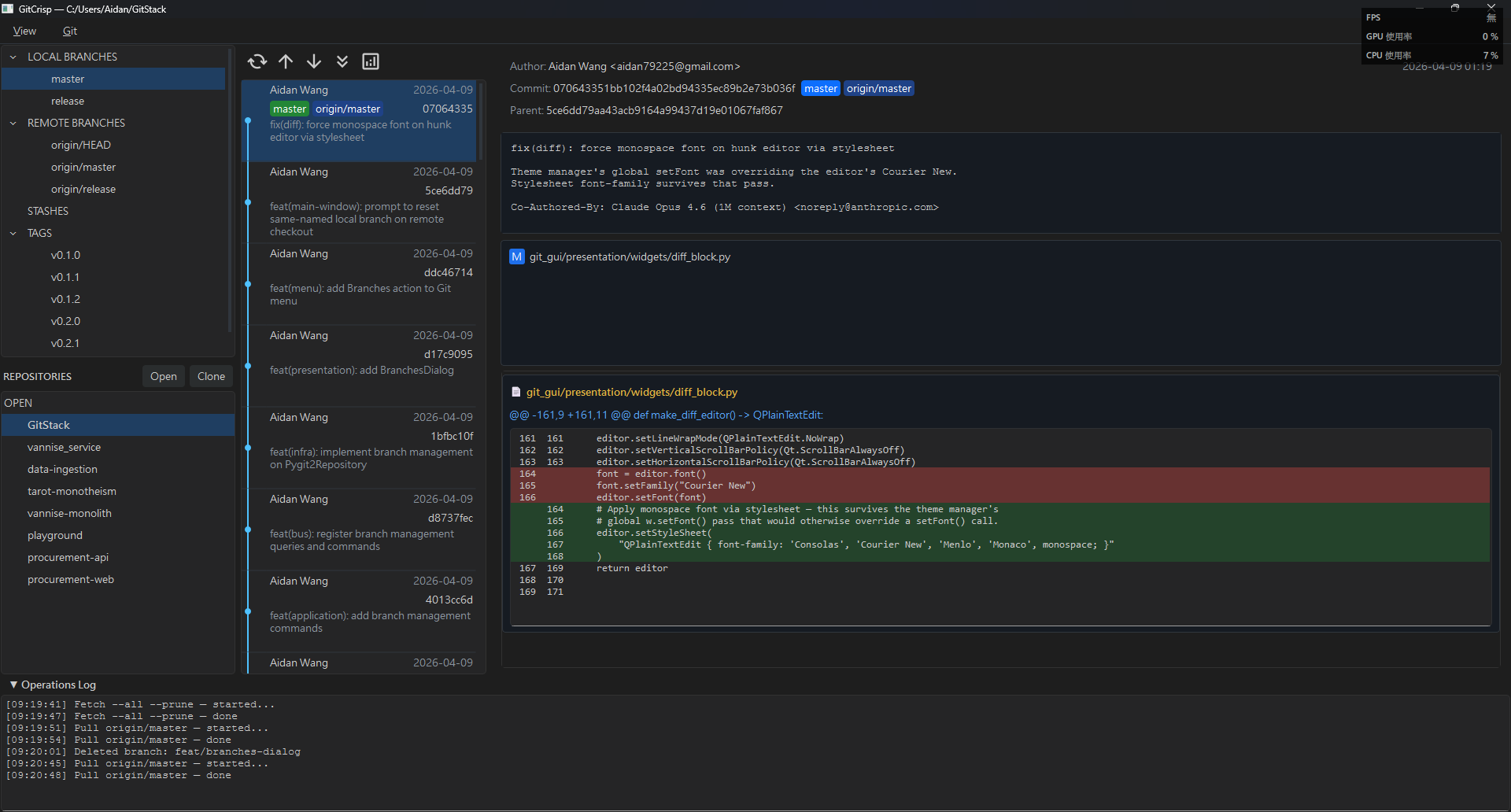
GitCrisp main window: commit graph, diff pane and sidebar

Three promises

Every feature below is one of these three, wearing a different hat.

One glance away

The answer is in this window, not the next one.

  • Blame beside the diff — it opens in the commit list's column, so clicking a line shows the commit that explains it without a window switch.
  • Reflog in that same column — one dense line per movement, the operation as a colour-coded chip.
  • File history in place — filter the commit list to one file, follow renames, and step back out with an ×.
  • Side-by-side or unified diff, word-level highlighting, syntax colouring, and lazy loading for big commits.
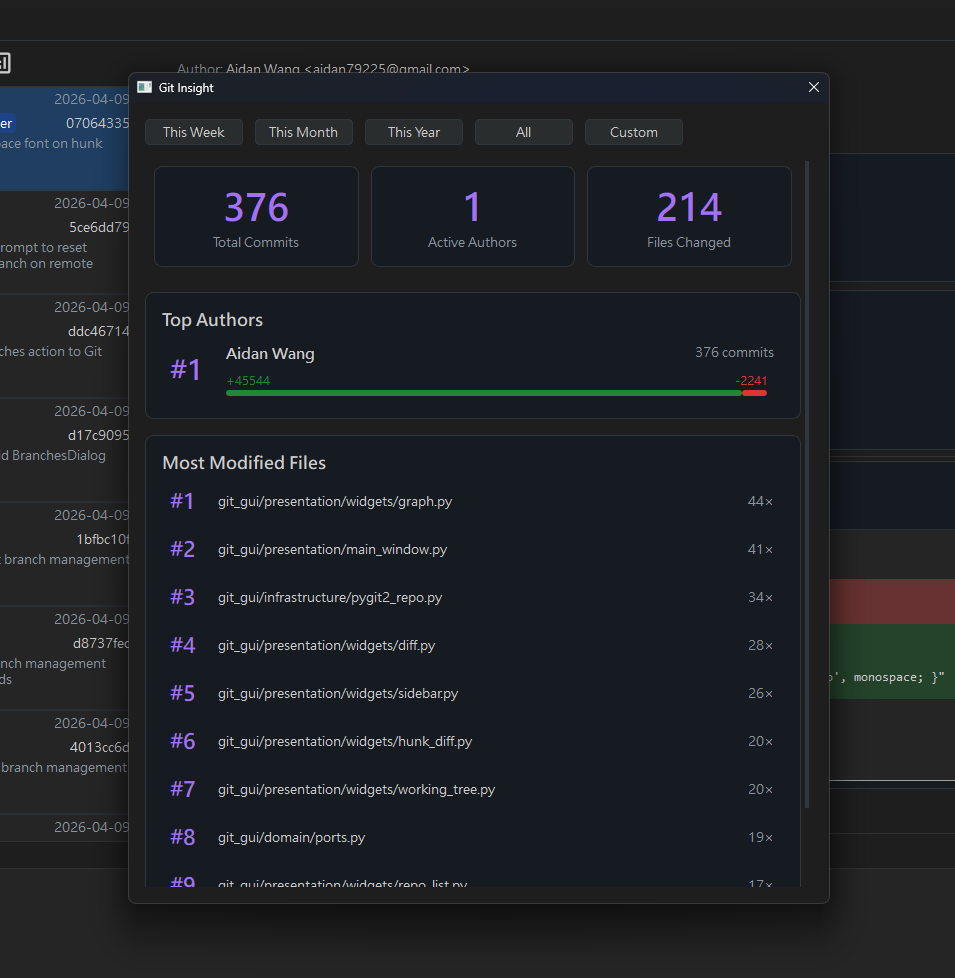
  • Insights — per-author stats that stream in with progress and a cancel, so All stays usable on an old repo.

One undo away

Nothing destructive happens unannounced, or unrecoverably.

  • Undo on the log line — reset, rebase, merge, cherry-pick and revert each leave a link back to the HEAD they started from.
  • Reflog restore reaches commits nothing references any more — after a bad rebase, the only place they exist.
  • Dirty-file preview before a hard reset, and the same reset dialog for every path that rewinds HEAD.
  • Force push asks first, then uses --force-with-lease.
  • Amend guards — disabled mid-merge, and it warns when a remote still points at the commit you are about to rewrite.

Nothing hidden

The state you would have had to go looking for comes to you.

  • Your branch's remote is drawn with it — select a local branch and the commits its upstream is holding ahead are right there.
  • Auto-refresh when the repo changes outside the app, with your scroll position kept.
  • Conflicts are marked, sorted to the top, split per conflict block, with Abort and Continue in both panels.
  • Worktrees and submodules report themselves — branch badges for worktrees, HEAD divergence for submodules.
  • Merge analysis before you merge — “can fast-forward” or “requires a merge commit”.

A closer look

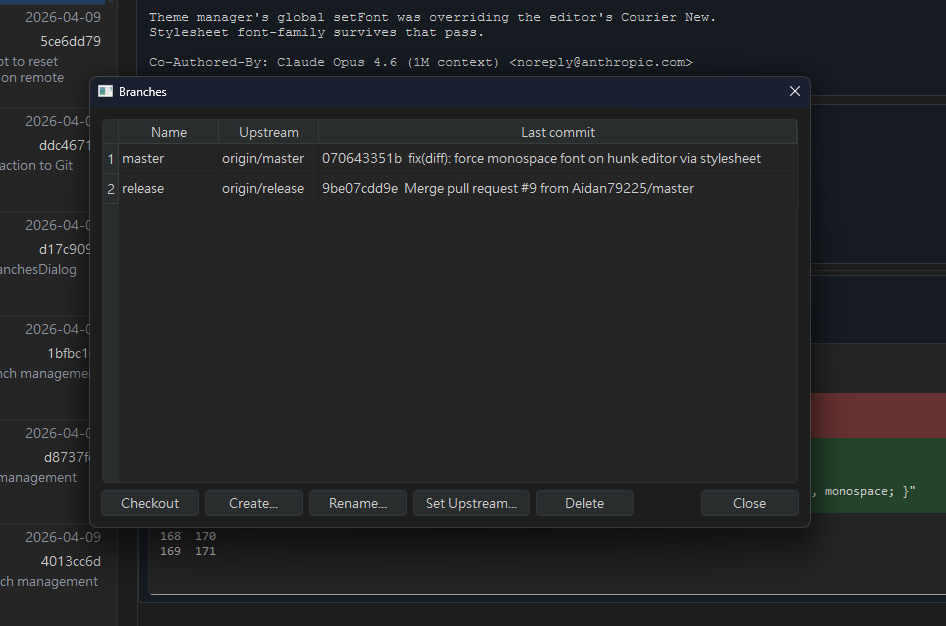
Branches dialog
Branches — upstream tracking, worktree badges, inline management
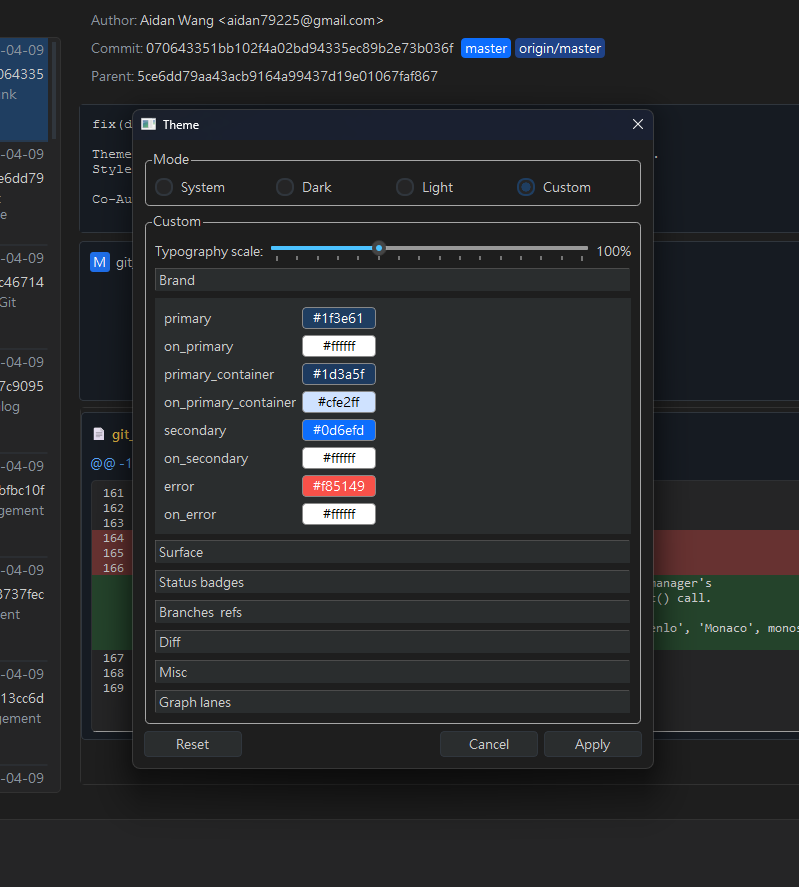
Appearance dialog
Appearance — light and dark, typography scale, token inspection
Insights dialog
Insights — per-author commit stats over any range

Everything in the box

The whole surface, grouped by what you came to do.

Commit graph

Lane-based topological graph with lazy pagination that expands to reach distant branches, inline search across message, author, hash and date (Ctrl+F), and click-to-copy of the full OID.

Working tree & staging

Stage by file or by hunk, discard a hunk or a whole file, add to .gitignore from the context menu, and amend the last commit with its message and author preserved.

Branches

Sidebar tree of local and remote branches, create / rename / delete / checkout, set or unset upstream, and a prompt to reset a local branch that collides with the remote you are checking out.

Merge & rebase

Merge dialog with strategy (ff-only / no-ff / allow-ff) and merge analysis; interactive rebase with pick / squash / fixup / drop and drag-to-reorder.

Commit operations

Cherry-pick, revert, and reset in soft / mixed / hard from any ancestor of HEAD — each one reversible from the log line it writes.

Conflicts

Abort / Continue banner in both panels, red C badges sorted to the top, ours/theirs colouring per conflict block, and a dual-parent row in the graph while a merge is in progress.

Tags & stash

Lightweight or annotated tags, delete and push individually. A Stash button appears in the graph header when the tree is dirty; view contents inline, then pop, apply or drop.

Remotes

Push, pull, fetch and fetch-all-prune in background threads with a status indicator, a remotes CRUD dialog, and batch deletion of remote branches from a filterable list.

Worktrees

List, add, lock, unlock and remove worktrees; they nest under their parent repo. Checking out a branch that lives in another worktree switches you there instead of erroring.

Submodules

Add, edit, remove and open submodules, clone with --recurse-submodules, and click a submodule diff header to jump straight into that repo.

Many repositories

Persistent open and recent lists, two-line entries that disambiguate same-named directories, drag-to-reorder, and Ctrl+W / Ctrl+1–9 to move between them.

Appearance

Material 3 light and dark themes with live preview, a typography scale that survives restarts, and a Custom panel that doubles as a token inspector showing every hex in use.

How it is built

Clean Architecture, strictly enforced: dependencies point inward, and the domain knows nothing about Qt or pygit2.

Domain Entities & protocols
Application Commands & queries
Infrastructure pygit2 adapter, git CLI, repo store
Presentation Qt widgets, dialogs & signal bus

Protocol-based injection, a signal bridge instead of widget-to-widget references, and background threads for everything that touches the network or a large history.